SMBs Under Attack
Small and mid-sized businesses face many of the same cyberthreats as larger organizations. Attackers use similar methods against businesses of every size, while smaller companies often have fewer internal resources available to detect an attack, contain it and recover.
Acronis Cyber Protect combines cybersecurity and data protection so businesses can protect devices and data while maintaining reliable recovery options. Access provides, deploys and supports Acronis Cyber Protect for Ontario SMBs that need stronger cyberattack protection for small businesses without managing multiple disconnected tools.
For businesses evaluating Acronis Cyber Protect in Toronto and the GTA, Access manages the deployment and ongoing protection as part of a broader IT security and backup strategy.
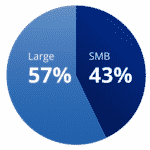
SMBs under attack
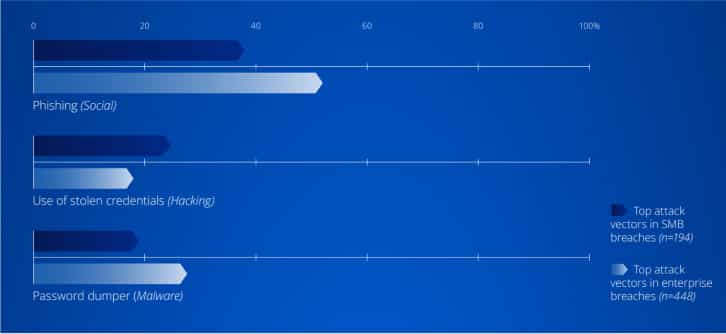
Today SMBs are being targeted by cybercriminals at nearly the same rate as larger organizations and the attack vectors cybercriminals employ for enterprises are almost identical to those aimed at SMBs.
Facing the same
sophisticated cyberthreats
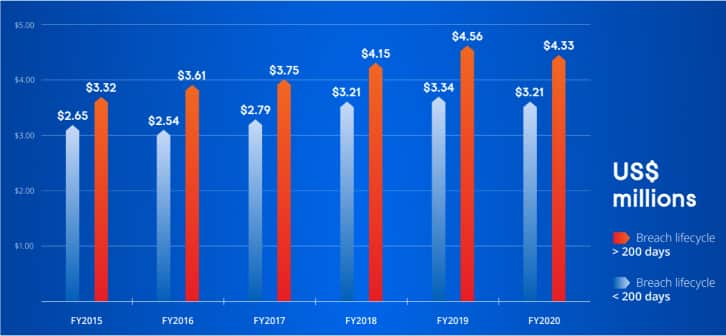
The cost of recovering from a
cyberattack has grown over time.
Longer-lasting data breaches make them
even more expensive.
Long Recovery Times
Recovering from an attack becomes
more difficult when security, backup
and management tools are spread
across different systems and vendors.
A more unified approach can simplify
response and help businesses restore
affected systems sooner.
High Recovery Costs
Downtime can quickly become expensive
when employees cannot access the systems
and data they need. Acronis currently
estimates the average hourly cost of
for SMBs at approximately $8,000
to $20,000.
Business Closure Risk
The consequences can extend well beyond
the immediate interruption. Acronis
currently cites that 60% of small businesses
that suffer a cyberattack shut down within
6 months, reinforcing the importance of
both prevention and reliable recovery.
Acronis Cyber Protect
Acronis brings protection management, anti-malware, and backup and recovery together as a unified cyber protection platform. Access configures and manages these capabilities as one service rather than treating each as a separate security or backup product. Acronis itself positions the platform as a combination of backup, anti-malware, antivirus and endpoint protection management.

Protection Management
 Access uses Acronis management capabilities
to help maintain protected devices, identify
vulnerabilities and manage important
security tasks from a centralized platform.
Capabilities can include vulnerability
assessment, patch management, remote
management and drive-health monitoring.
Anti-Malware
Acronis provides AI-based protection against
malware and other endpoint threats, along
with capabilities such as URL filtering and
backup scanning. Combining backup and
anti-malware in one solution helps reduce
the number of separate tools required to
protect and recover business systems.
Backup
and Recovery
Acronis protects business applications,
systems and data so they can be recovered
after accidental deletion, hardware failure,
malware or another disruption. Backup can
extend across physical, virtual and cloud
environments, giving Access multiple recovery
options based on the systems being protected.
Acronis complements the broader IT security
and cybersecurity solutions and remote backup
and business continuity services
available through Access.
SMB organizations gain better protection from the latest cyber threats — simply and effectively with one, unified solution:
Acronis Cyber Protect.