
IT Budget Planning for Small Businesses: What to Include and How Much to Spend
Build a clear, realistic technology budget for 2026, so hardware refreshes, cybersecurity investments, and cloud costs no longer come as surprises.
Technology supports nearly every part of a modern business, including communication, customer service, finance, sales, operations, and data protection. However, many businesses review technology costs only when equipment fails, a licence renews, or a security issue requires immediate attention.
Effective IT budget planning for small businesses replaces these unexpected expenses with a documented schedule of costs, priorities, and risks. It helps owners determine what should be replaced now, what can wait, and when choosing the lowest-cost option could create a greater operational or security risk.
Why IT Budgeting Deserves More Attention in 2026
Hardware and remote work tools: Many organizations quickly added laptops, remote access tools, and cloud subscriptions in 2020 and 2021. These devices and agreements now require a formal review. Some endpoints may be approaching a practical refresh point; others may still perform well but need warranty, operating system, or compatibility planning.
Cybersecurity: Security should be a fixed line item in the IT budget of every Ontario small business. According to Statistics Canada, 16% of Canadian businesses were affected by cybersecurity incidents in 2023. Businesses also spent $11.0 billion on prevention and detection and $1.2 billion on recovery. Security is therefore not an occasional project; it is an ongoing business cost.
AI tools: An initial pilot may eventually lead to per-user licences, data controls, employee training, and integration work. These expenses should be approved against a clear business use case rather than absorbed quietly across department budgets.
Cloud and software subscriptions: Small monthly increases may seem manageable in isolation. However, duplicated applications, unused accounts, growing storage requirements, and annual price changes can materially increase total spending.
What Should Actually Be in a Small Business IT Budget?
A complete budget should cover the full cost of running, protecting, and improving the technology environment. The following categories provide a practical structure for technology budget planning and make it easier to identify missing costs.
Hardware and Lifecycle
List workstations, laptops, servers, firewalls, switches, wireless access points, printers, and essential accessories. For planning purposes, many businesses begin reviewing endpoints after three to five years and servers after four to six years; actual timing should reflect performance, warranty coverage, vendor support, security requirements, and business use.
Do not assume every asset must be replaced at the same age. Record purchase dates, condition, expected replacement year, and estimated cost so upgrades can be phased without disrupting cash flow.
Software and Licensing
Include operating systems, Microsoft 365, accounting platforms, customer relationship management software, industry applications and smaller tools used by individual teams. Record the number of licences, billing frequency, renewal date, owner and cancellation terms.
This category should also identify overlapping functions. Two departments may be paying for different tools that solve the same problem; consolidating them can reduce cost and simplify support.
Cybersecurity
Budget for endpoint protection, email security, firewall subscriptions, multi-factor authentication, security awareness training, vulnerability management and incident response planning. Backup and disaster recovery, including platforms such as Acronis, should also be treated as a defined security and continuity expense.
The correct security budget depends on the sensitivity of your data, contractual obligations, regulatory requirements and cyber insurance conditions. Cutting a control without assessing the related risk can create a much larger exposure than the immediate saving.
Cloud Infrastructure
Include Microsoft Azure, hosted servers, cloud storage, data transfer, backup capacity and any managed cloud services. Usage-based services require active monitoring because cost can increase as users, files, workloads and retention periods grow.
Assign an owner to review consumption and remove unused resources. A cloud budget should be based on expected usage, with alerts for unusual changes, rather than last month’s invoice alone.
IT Support and Help Desk
Account for help desk access, remote monitoring and management, patching, maintenance, on-site support and after-hours coverage. Compare service options using scope, response commitments and included support; not hourly price alone.
Predictable support is easier to budget when routine monitoring and maintenance are defined in advance. Access can help businesses review both Information Technology requirements and Remote Monitoring & Management needs as part of the same operating plan.
Strategic Consulting
Set aside time for technology reviews, roadmaps, policy updates, vendor decisions and project planning. This work is sometimes described as virtual chief information officer guidance, but the practical goal is simple: make sure technology decisions support business priorities and are sequenced realistically.
Contingency
Keep a separate allowance for urgent issues such as a failed drive, an unexpected security response, emergency replacement equipment, or a vendor price change. The amount should reflect the age and criticality of your systems; it should not replace planned lifecycle spending.
How Much Should a Small Business Actually Spend on IT?
There is no single percentage that works for every company. Revenue, headcount, industry, growth plans, location, existing technical debt, and data sensitivity all influence the appropriate IT budget.
The following ranges can provide an initial benchmark:
- Typical organizations: Approximately 4% to 7% of annual revenue
- Data-sensitive or regulated businesses: Approximately 6% to 8% of annual revenue
- 2025 industry benchmark: Deloitte’s 2025 Tech Spending Outlook found that the average technology budget among 302 surveyed leaders was 5% of revenue
These percentages are starting points, not fixed rules. A small Ontario business should adjust its budget according to its size, risks, operating model, and upcoming technology needs.
When determining how much a small business should spend on IT, consider what the percentage represents:
- A lower ratio may reflect an efficient technology environment; however, it could also indicate unsupported systems, weak backups, or overdue replacements.
- A higher ratio may be reasonable during a business expansion, office relocation, cloud migration, security upgrade, or major equipment refresh.
- Bundling support, monitoring, licensing, and procurement with one accountable provider may reduce duplicated work and make costs easier to track.
Always compare the total cost and scope of service instead of assuming that working with several separate vendors will be less expensive.
Common IT Budgeting Mistakes Small Businesses Make
Most budgeting problems come from missing categories, outdated assumptions, or a lack of regular review. A strong approach to IT budgeting for small businesses in Canada avoids the following errors:
- Budgeting for hardware only: Software renewals, cloud consumption, support, backup, and security can represent a significant share of annual spending.
- Waiting for equipment to fail: Emergency replacements reduce purchasing options and can create downtime, rushed migrations, or unexpected data recovery work.
- Treating cybersecurity as optional: Core safeguards should be recurring operating costs, not additions considered only after an incident or insurance review.
- Leaving out contingency: Without a reserve, one urgent issue can displace planned upgrades or create a cash flow problem.
- Reviewing the budget only once a year: Headcount, software usage, threats and vendor pricing can change well before the next annual planning cycle.
- Comparing price without scope: A low quote may exclude onboarding, on-site work, after-hours support, project labour, backup testing or security controls.
A Practical Process for Building Your IT Budget
The best IT budget template small business owners can use is one built from their actual environment. Follow this process to turn asset and contract information into an actionable annual plan.
1. Inventory What You Have
Create a list of hardware, software, cloud services, and support contracts. Record age, warranty status, licence count, renewal date, monthly or annual cost, business owner, and vendor.
2. Flag Overdue and Upcoming Needs
Identify unsupported systems, expired warranties, and assets likely to require attention within the next 12 months. Separate routine renewals from one-time projects so both are visible.
3. Separate Requirements From Improvements
Prioritize security, compliance, backup, core operations, and support obligations. Then rank improvements such as new collaboration tools, automation, or performance upgrades by expected business value.
4. Collect Comparable Proposals
Request pricing before the budget is approved. Ask each vendor to state what is included, what is excluded, the contract term, and any implementation or migration costs. Procurement Services can simplify sourcing and vendor coordination, while Consulting Services can help align purchases with the wider technology roadmap.
5. Review the Budget Quarterly
Compare planned and actual spending every three months. Update headcount, usage, project timing, and risks; then reallocate funds before a small variance becomes a year-end surprise.
Why Ontario Small Businesses Often Budget With an IT Partner
An experienced partner can connect technical requirements with financial planning. This is especially useful when a business has no internal IT leader or needs a second opinion on priorities.
A managed IT provider can review the age and condition of the environment, compare service options, and identify gaps before they become urgent. Bundled monitoring, support and procurement can also convert irregular break-fix spending into more predictable monthly costs.
When comparing managed IT services cost in Toronto, ask for a clear service schedule: supported users and devices, monitoring, patching, cybersecurity tools, backup, on-site visits, response targets and project exclusions. A monthly price without this context is not a meaningful comparison.
Local support also matters when a budget includes office moves, cabling, network equipment, server work or device deployment. Access combines IT Services with Remote Backup & Business Continuity planning, helping GTA businesses view daily support, resilience and future projects as one connected budget.
Quick Reference: IT Budget Checklist
Use this annual IT budget checklist to confirm that recurring operations, planned improvements and unexpected costs are all represented. It can also support discussions with finance, leadership and external providers.
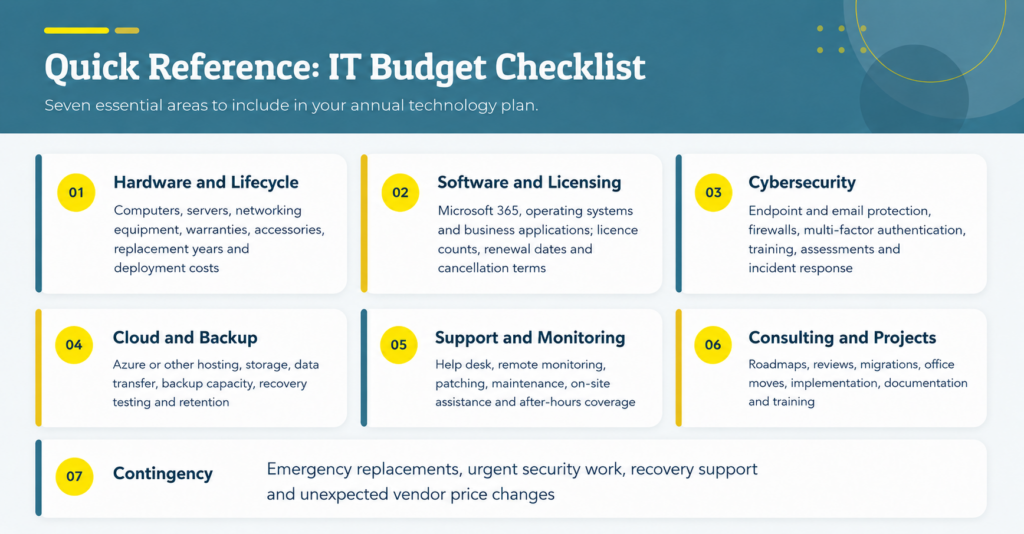
No table can determine whether the total is right on its own. Use IT spending benchmarks small business leaders encounter as a reasonableness check; then validate the result against actual assets, contracts, risks, and business goals.
Ready to Build an IT Budget That Actually Holds Up?
A useful IT budget gives your business a clear replacement schedule, predictable operating costs, and a practical plan for security and growth. Access can review your hardware, software, cloud subscriptions, support needs, and cybersecurity requirements; identify aging systems and hidden costs; and separate urgent investments from upgrades that can be phased over time. The result is a realistic 12-month budget aligned with your operations, risk exposure, and plans, with room for unexpected expenses and fewer last-minute technology decisions.
Frequently Asked Questions About IT Budget Planning
1. How far in advance should a small business plan its IT budget?
Create a detailed 12-month budget supported by a three-year outlook for major replacements, upgrades, and projects.
2. Should capital and operating IT expenses be separated?
Yes. Hardware purchases and major projects are often treated differently from recurring costs such as licences, cloud services, security tools, and IT support. Confirm the accounting treatment with your financial adviser.
3. How should a business budget for new employees?
Include the full technology cost for each new hire: equipment, software licences, security tools, setup, training, and ongoing support.
4. Who should be involved in IT budget planning?
Business leadership, finance, department managers, and the internal or external IT team should contribute so the budget reflects operational priorities, technical requirements, and financial limits.
5. What should be prioritized when the IT budget is limited?
Address unsupported systems, cybersecurity gaps, backup weaknesses, and equipment that could interrupt operations first. Lower-priority improvements can then be phased over time.