
Microsoft Quietly Extended Windows 10 Free Security Updates to 2027: What It Actually Means for Your Business
Microsoft has given Windows 10 users more time. In June 2026, the company extended its consumer Extended Security Updates (ESU) program for another year, allowing eligible personal Windows 10 devices to continue receiving critical and important security updates through October 12, 2027.
For businesses, however, the headline needs context. The free extension applies to personal-use devices. It does not mean Microsoft has given commercial Windows 10 environments another free year. Organizations running Windows 10 remain subject to the separate commercial ESU program, with paid licensing that increases each year.
If your company still has Windows 10 workstations, this distinction can affect upgrade timing, hardware budgets and security planning. If you are unsure which devices are covered, talk to an IT consultant to clarify what actually needs to happen next.
What Microsoft Actually Announced
Microsoft did not introduce the change through a major new Windows launch announcement. Instead, an editor’s note dated June 25, 2026, was added to its June 2025 Windows Experience Blog post, confirming that ESU coverage for personal-use Windows 10 devices had been extended through October 12, 2027. Devices already enrolled continue automatically, with no additional action required.
This means Windows 10 security updates extended coverage is available for eligible consumer devices running Windows 10 version 22H2.
ESU is limited in scope. It provides critical security updates, but it does not restore Windows 10 to normal support. There are no new Windows features, general non-security updates, design changes or standard technical support included.
So, if you are wondering if Windows 10 is still supported, the answer is no in the normal sense. Standard Windows 10 support ended on October 14, 2025. ESU is a temporary security bridge for devices that remain on the operating system.
The extra consumer year gives people more time to transition, but it should not be interpreted as a change to the long-term direction. Microsoft continues to recommend moving eligible PCs to Windows 11.
The Catch: The Free Extension Is for Consumers, Not Businesses
The most important detail is the Windows 10 ESU business versus consumer distinction. For eligible personal PCs, Microsoft currently provides three consumer enrollment options:
- Sync Windows PC settings through Windows Backup at no additional cost.
- Redeem 1,000 Microsoft Rewards points.
- Make a one-time purchase of approximately C$42, plus applicable tax.
Those options now provide eligible consumer devices with coverage through October 12, 2027. Microsoft also states that the consumer program cannot be used in commercial scenarios such as devices joined to an Active Directory domain or Microsoft Entra, or devices enrolled in certain mobile device management environments.
Windows 10 ESU for businesses remains a separate commercial program. Microsoft currently lists Year One commercial ESU at $61 USD per device. The price doubles in each consecutive year, and coverage can continue for a maximum of three years. ESU is also cumulative. If an organization waits until Year Two to purchase coverage, it must also pay for Year One.
That makes the Windows 10 ESU cost per device approximately:
- Year 1: C$85 per device
- Year 2: C$170 per device
- Year 3: C$340 per device
These Canadian-dollar amounts are approximate because Microsoft sets commercial ESU pricing in U.S. dollars. The actual cost will depend on the exchange rate and applicable partner or licensing arrangements at the time of purchase.
Seeing headlines like “Windows 10 gets another free year” and assuming the same applies to every office computer could therefore lead to an expensive planning mistake. For devices that can move forward, the better question is often whether paying for another ESU year makes more sense than completing a Windows 11 upgrade.
What This Means If Your Business Is Still on Windows 10
For businesses dealing with the Windows 10 end of support in 2026, the key question is whether to continue with paid ESU coverage or complete the move to Windows 11. What ends in October 2026 is the first year of commercial ESU coverage.
Commercial organizations can continue purchasing ESU for up to three years after the original end-of-support date. What you should do now depends on your devices.
- Your Devices Are Already Enrolled in Commercial ESU: The consumer announcement does not change your commercial arrangement. Your devices remain on Microsoft’s existing paid ESU schedule.
- Your Devices Can Run Windows 11: The consumer extension does not remove the reason to migrate. If your applications, hardware and workflows are compatible, completing a Windows 11 upgrade for your business in Ontario may be a better long-term investment than continuing to pay annually for temporary Windows 10 coverage.
- Your devices cannot run Windows 11: Commercial ESU can provide additional time if the device itself must remain on Windows 10. That time can be used to plan hardware replacement, application remediation or another supported migration path instead of carrying unsupported systems indefinitely.
A separate issue also deserves attention. Microsoft’s 2011-era Secure Boot certificates began reaching expiry dates in June 2026. Microsoft is rolling out replacement 2023 certificates, and this transition should be monitored separately from ESU status. The certificate expiry does not mean Secure Boot itself suddenly stops working, but Microsoft advises organizations to ensure applicable systems receive the updated certificates.
This is where remote monitoring and management becomes useful: operating system version, patching, device status and lifecycle risks can be tracked across the environment rather than discovered one computer at a time.
Consumer vs. Business ESU at a Glance
Below, we summarize the key differences between consumer and commercial Windows 10 ESU coverage.
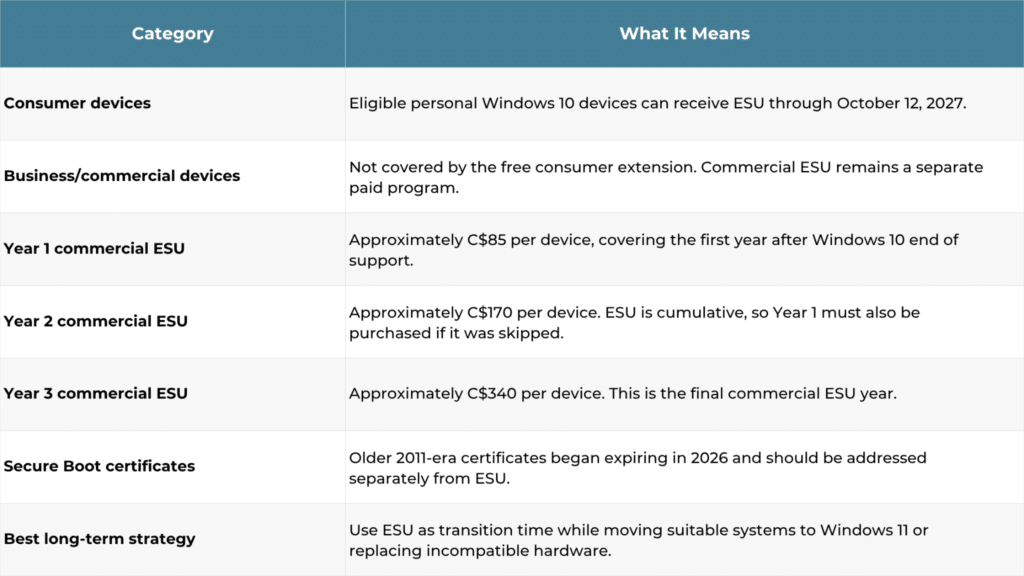
Microsoft’s lifecycle documentation currently lists commercial Windows 10 ESU coverage through October 10, 2028, at the latest.
Why This Keeps Catching Businesses Off Guard
The confusion is understandable. Consumer technology coverage often focuses on the simple headline: Windows 10 users received another year of security updates. The licensing distinction is much easier to miss.
Small and mid-sized businesses may also have mixed environments. Some computers are centrally managed company assets, while other devices may have started as personal PCs. That does not mean the same ESU rules apply to all of them.
Microsoft’s June 2026 change, appearing as an update to an existing post, makes the distinction even easier to overlook.
The safest approach is to determine coverage based on each device’s actual configuration and licensing status rather than assuming the entire fleet qualifies for the same program.
A Practical Next-Step Checklist for Ontario Businesses
You do not need to replace every Windows 10 computer immediately. You do need to know what you have and why each device is staying.
- Inventory Every Remaining Windows 10 Device: Record its model, Windows edition, business function and Windows 11 eligibility.
- Confirm ESU Status: Determine which machines are commercially enrolled and identify any devices that are not receiving extended updates.
- Upgrade Compatible Devices First: Prioritize systems that can move to Windows 11 without major hardware or application changes.
- Reserve Commercial ESU for Genuine Transition Needs: Under current Windows 10 commercial ESU pricing, delaying migration becomes progressively more expensive.
- Check Secure Boot Separately: Confirm that applicable devices are receiving Microsoft’s updated Secure Boot certificates.
- Review the Plan Regularly: Licensing, hardware requirements, and Microsoft lifecycle guidance can change, so revisit the inventory and migration schedule each quarter.
When replacement hardware is required, our procurement services can also help coordinate Windows 11-ready equipment with your broader rollout instead of treating every workstation purchase as a separate decision.
Why Ontario Businesses Are Handling This With an IT Partner
A Windows migration is rarely just an operating system installation. A proper assessment also considers hardware age, application compatibility, security controls, user requirements, backup readiness and the cost of keeping older equipment running.
With managed IT services in Toronto, we can review your environment device by device, identify which systems should be upgraded and determine where temporary ESU coverage still makes financial or operational sense. Our IT Services can also support the wider migration, while local support helps address issues that are specific to your actual network and users.
For systems carrying important business data, migration planning should also account for recovery. Reviewing remote backup and business continuity before a major Windows 11 migration helps ensure the upgrade plan includes a clear path for protecting and recovering business information.
Not Sure Where Your Business Stands on Windows 10? Let’s Find Out
Microsoft’s extra year of free Windows 10 security updates gives consumers more time. It does not give commercial Windows 10 environments a free extension.
For businesses, ESU should be treated as a temporary bridge rather than a reason to postpone planning. Inventory your remaining Windows 10 systems, identify which devices can move to Windows 11, and use paid ESU only where additional transition time genuinely makes sense.
If you are not certain which systems are covered or whether upgrading or replacing them will cost less over the next two years, contact us to review your Windows 10 environment and build a practical migration plan.